Skip to content
New · NeoProof

From the blank sheet to each student's score.

NeoProof creates answer sheets, identifies each student and grades exams read by scanner or phone, in minutes and without typing a single score.

For Windows and Linux · Android app

The problem

Grading multiple-choice exams still takes days

  • Grading one by one

    Checking every sheet against the answer key is slow and tiring.

  • Counting and typing mistakes

    One wrongly typed score changes a student's result, and nobody notices.

  • Sheets without identification

    Handwritten names, swapped sheets and mixed classes delay the closing of grades.

Days of grading that could become teaching time and feedback.

NeoProof takes care of the whole cycle: create, identify, read and grade.

The solution

From sheet to report card in a single app

Create

Build the answer sheet your way

Choose questions in columns, the number of options and the identification fields, or reuse a sheet your school already uses. Align, distribute and duplicate elements in a few clicks.

  • Ready-made templates to start
  • Questions in columns, with snapping to align
  • Generate one sheet per student, with a QR code and class data
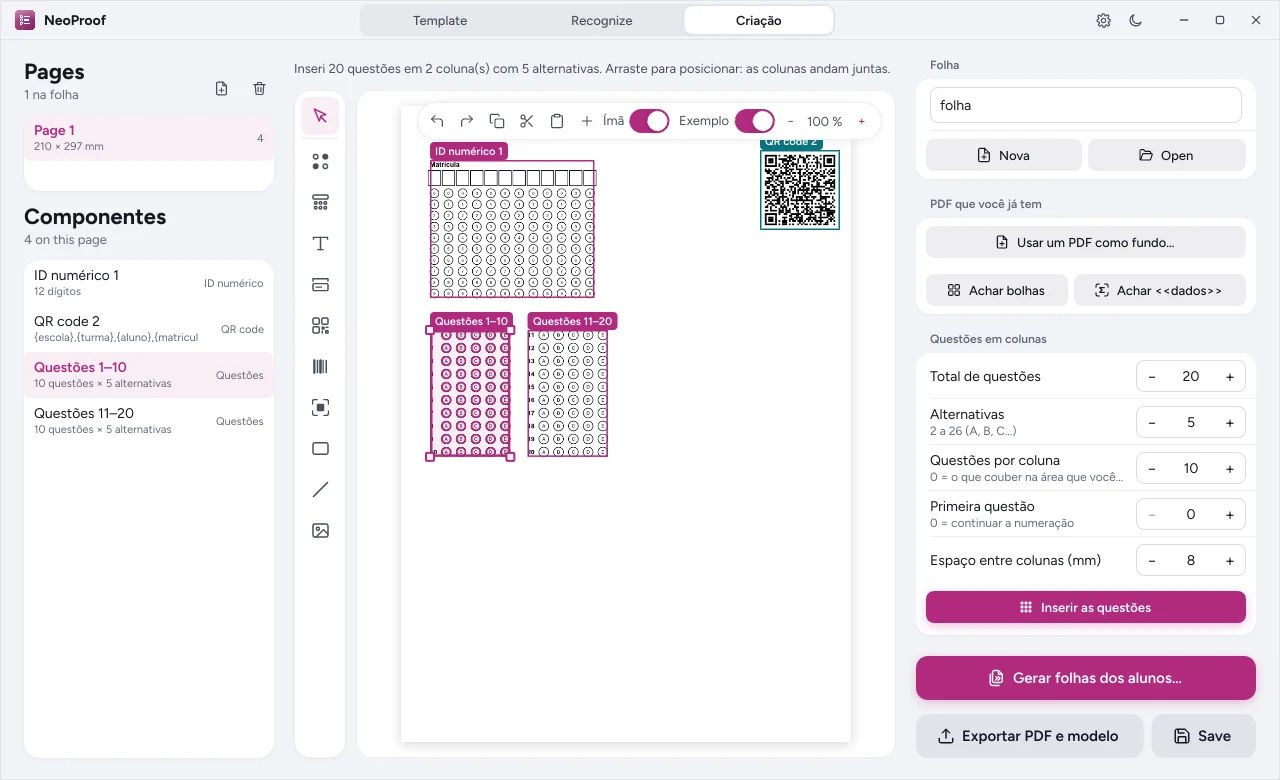
Answer sheet with bubbles and an identification QR code
Read

Marks, text and QR read at once

Scan the sheets or photograph them with your phone. NeoProof aligns every page, even crooked or upside down, and reads the bubbles, the text fields and each student's QR code.

  • Many pages in a batch, with progress
  • Sheet identified by QR, no name typing
  • Phone photos sent to the computer over the school network
Grade

Answer key with score, hits and misses

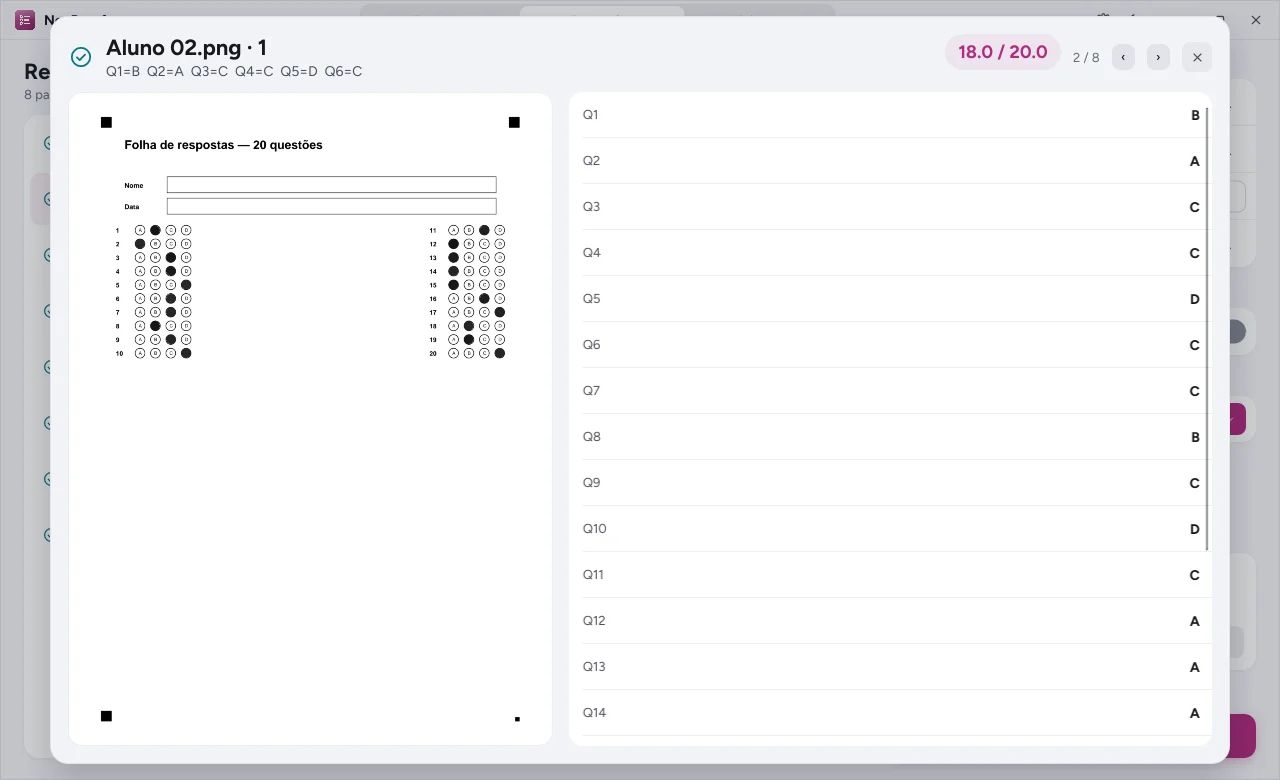
Set up the answer key with sections, weights, bonuses and voided questions. Each sheet gets a score, correct answers, wrong answers and blanks, ready to export to a spreadsheet.

  • Voided questions and extra points
  • Results per student and per class
  • Spreadsheet for the gradebook and the coordinators
Panel with a student's score, correct and wrong answers
How it works

Four steps, from exam to score

  1. Step 1

    Create

    Build the sheet and the answer key, or use a ready-made template.

  2. Step 2

    Generate

    One sheet per student, with a QR code, ready to print.

  3. Step 3

    Read

    Scan or photograph the sheets and let NeoProof recognize them.

  4. Step 4

    Grade

    Check the results and export the scores to a spreadsheet.

And more

Built for school routine

  • Your data stays with you

    Sheets and scores are read and stored on your computer.

  • Android app

    Photograph the sheets and send them to the computer, no cables. Get it in Downloads.

  • Automation

    Command line and tools for AI assistants, to fit your routine.

  • Three languages

    English, Portuguese and Spanish, in the app and on the sheets.

  • On its own or in the Neo Suite

    Buy NeoProof alone or together with NeoMath, NeoChem and NeoConverter.

  • Accessible interface

    The same look as the other apps, tested for color blindness and contrast.

Frequently asked questions

Is NeoProof available yet?

It is the newest member of the Neo family and is being rolled out to the first schools. Talk to a specialist to see the app and join the rollout list.

Do I need a special scanner?

No. A regular scanner or a phone camera is enough. NeoProof fixes the sheet alignment automatically.

Does it work with sheets my school already uses?

Yes. You can mark the areas on an existing sheet instead of creating a new one.

Do the scores leave my computer?

No. Reading and grading happen on your computer. You decide when and where to export the spreadsheet.

Can I buy NeoProof on its own?

Yes. NeoProof has its own license. You can also add other programs or choose the Neo Suite, with all of them.

Grade the next exam in minutes

Talk to a specialist and see NeoProof reading sheets the way your school uses them.